1. What Nexus v4 does
Nexus Trader v4 is a fully automatic strategy built on the Quad Rotation method: four stacked stochastics (9-3, 14-3, 40-4 and 60-10) read together to find momentum running out at price extremes. It takes one kind of trade, a two-stage divergence, only in the direction of the trend, with a fixed stop, a 2R target and a time limit.
It's the TradingView version of the Nexus Trader 4.0 strategy for NinjaTrader 8 and trades the same rules. It was built and tested for the 5-minute chart on MES and ES futures.
2. Getting access
Nexus Trader v4 is an invite-only script. It's added to your TradingView account by username.
- Members (DayTradingRadio.com, the $50+ Patreon tiers, Bundle owners) get it with all 8 DTR TradingView scripts.
- Nexus Trader buyers get Nexus Trader v4 and the original Nexus Trader script.
If you haven't sent your TradingView username yet, enter it here (your username, not your email). It's added automatically, usually within minutes:
3. Load it on your chart
- Open a 5-minute chart of MES or ES (the continuous contract, e.g. MES1!, is fine).
- Click Indicators (the fx button) at the top of the chart.
- On the left, click Invite-Only Scripts.
- Click Nexus Trader v4. It appears on your chart, and its results open in the Strategy Tester panel at the bottom.
- Click the gear icon next to its name on the chart to open the settings (next section).
4. Settings you control
Only sizing, risk and the broker connection are adjustable. The trade rules (lookbacks, stop buffer, ATR floor, 2R target, 3-hour time stop) are locked at the tested settings, so you can't set something wrong.
Inputs tab
| Setting | What it does |
|---|---|
| Risk Per Trade ($) | The dollars you lose if a trade hits its stop. Nexus works out the contracts from this. Tested at $200. |
| Max Contracts | A ceiling on size for very tight stops. Rule of thumb: about 7 contracts per $200 of risk. Raise it when you raise Risk Per Trade, or the cap holds size back. |
| Take 1 Contract If Over Risk | When even one contract would risk more than Risk Per Trade (a very wide stop): on = take 1 contract anyway, off = skip the trade. |
| Daily Loss Limit | Optional. Stops new trades for the day once the day's loss reaches your limit. Strongly recommended on prop accounts. |
| Flatten Minutes Before Session Close | How many minutes before the session close any open trade is closed. |
| Broker Connection | Which order format Nexus writes for your alerts: TradersPost, PickMyTrade, CrossTrade (NinjaTrader), generic JSON, or your own template. See section 8. |
Properties tab
Set these to match your account so the Strategy Tester numbers are realistic: Initial capital, Commission (per contract, per side) and Slippage. The script ships with $50,000 capital, $0.62 commission per contract per side and 1 tick of slippage.
5. How it trades
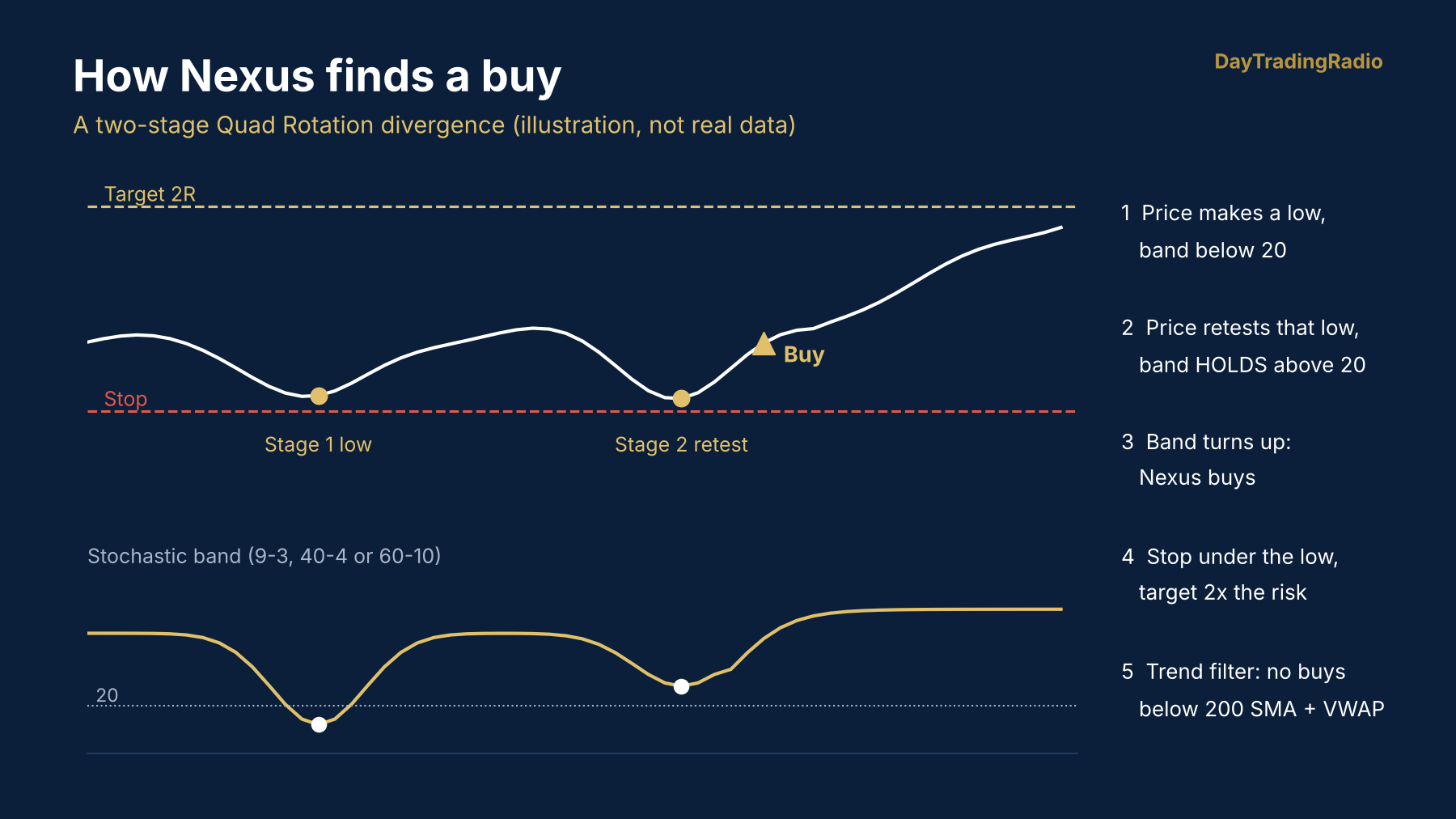
Illustration of a buy setup, not real data.
The entry: a two-stage divergence
Nexus watches the fast 9-3, the medium 40-4 and the slow 60-10 bands (the %D line). For a buy:
- Stage 1: price makes a 20-bar low while the band is below 20 (oversold).
- The band climbs back above 20.
- Stage 2: price comes back down to retest the Stage 1 candle body while the band holds above 20. Price is at or below the old low, momentum isn't. That's the divergence.
- Stage 1 and Stage 2 must be at least 6 candles apart, so a quick two-bar wiggle doesn't count.
- Trigger: the band turns up past its previous two readings, and Nexus enters.
Sells are the mirror image at 80. A setup that hasn't triggered within 120 bars is dropped. When two or three bands diverge the same way within 10 bars, the chart marks it as a MULTI setup.
The trend filter
Price below both the 200 SMA and the session VWAP is a bearish regime: no longs. Price above both is bullish: no shorts. When they disagree, both directions are allowed.
Risk and exits
- Stop: 4 ticks beyond the divergence low (or high), but never closer than 2 x ATR(14), so it sits outside normal 5-minute noise.
- Target: 2R (twice the risk), placed as a resting limit order.
- Time stop: a trade that hasn't reached its target after 36 bars (3 hours on a 5-minute chart) is closed.
- Session: no new entries in the last 15 minutes of the session, and any open trade is closed before the close.
- One position at a time: no adding, no reversing, no early exits.
6. Reading the chart
- Divergence boxes and lines from Stage 1 to Stage 2: 9-3 (white) 40-4 (blue) 60-10 (gold)
- Stop and target lines while a trade is open.
- Status panel with the trend regime, your position, all four band readings, trade statistics, today's P&L, and the last decision Nexus made, including setups it skipped and why. If you're wondering why it didn't take a trade, look here first.
7. Choosing your risk
Every trade risks about the same dollars: a tight stop trades more contracts, a wide stop fewer. Example at $200 Risk Per Trade and 7 Max Contracts (MES is $5 a point):
| Tight stop (3 points) | Wide stop (10 points) | |
|---|---|---|
| Risk per contract | $15 | $50 |
| Contracts | 13, capped at 7 | 4 |
| Loss if stopped | about $105 | about $200 |
| Win at the 2R target | about $210 | about $400 |
Profit and drawdown grow together, so pick your risk from the drawdown your account can take, not the profit you want. These are the same 188 backtest trades re-sized:
| Risk Per Trade | Max Contracts | Total profit | Worst drawdown |
|---|---|---|---|
| $200 | 7 | $5,791 | -$1,634 |
| $400 | 14 | $11,613 | -$3,386 |
| $600 | 20 | $18,173 | -$5,120 |
| $1,000 | 30 | $31,107 | -$8,266 |
Hypothetical NinjaTrader backtest of the same rules, MES 5-minute, Apr 20 – Nov 6 2026, after commissions.
8. Connect your broker (optional)
You can run Nexus as a signal tool and place trades yourself, or let it send orders automatically. To automate it you need a TradingView plan that supports webhook alerts (TradingView requires a paid plan and two-factor authentication for webhooks) and an account with one of the connectors below.
Step 1: pick your connector in the settings
Open Nexus Trader v4's settings and choose your service under Broker Connection: TradersPost, PickMyTrade, CrossTrade (for NinjaTrader accounts), generic JSON, or a custom template. Fill in any account or ticker fields that connector shows, then click OK.
Step 2: create one alert
- In TradingView click Alert (the clock icon) or press Alt+A.
- Condition: Nexus Trader v4.
- Choose Order fills only.
- Message: delete everything in the box and paste exactly:
{{strategy.order.alert_message}} - Notifications: tick Webhook URL and paste the webhook URL from your TradersPost, PickMyTrade or CrossTrade account.
- Set the expiration to open-ended and click Create.
That one alert handles everything. Every entry carries its stop and target, so your broker holds the bracket even if TradingView goes offline, and every exit sends a close-position message to keep the account in sync.
9. Rules that keep the edge
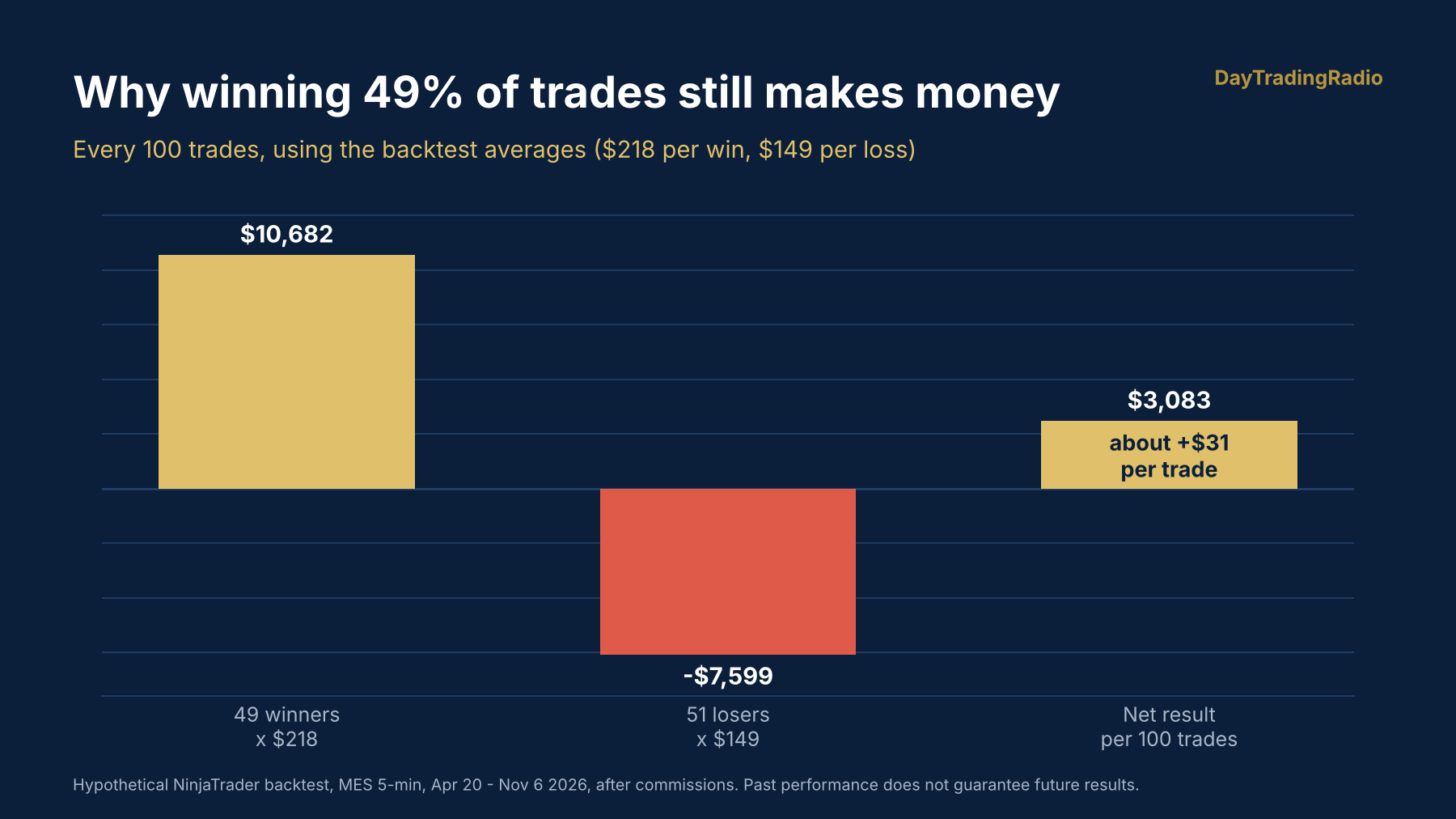
Nexus wins about half its trades. That's by design: the average win in testing was $218 against an average loss of $149, so it breaks even at roughly a 41% win rate.
- Sim first. Run it on paper or Sim for 3–4 weeks before live money.
- 5-minute MES/ES only. The rules were tested on that chart. Faster charts lost money with the same rules.
- Size from the drawdown, not the profit you want.
- Don't interfere. No moving stops, no early exits. The 2R winners have to be allowed to pay for the losers.
- Expect losing streaks. Seven losses in a row happened in testing. Plan for more.
- Use the Daily Loss Limit on prop accounts.
- One chart, one alert per account. Two copies on one account will fight over the same position.
- Judge it by months, not days. Give it 4–6 weeks before deciding.
10. Troubleshooting & support
| Problem | Fix |
|---|---|
| Not in Invite-Only Scripts | Log out of TradingView and back in. Check you're on the account whose username you submitted. Still missing? Submit your username at /tv-signup. |
| No trades on the chart | Make sure the chart is 5-minute MES or ES with enough history loaded (a few days, for the 200 SMA). Check the status panel's last decision. |
| Strategy Tester numbers look different from this manual | Set Initial capital, Commission and Slippage in Properties to match your account. TradingView only loads a limited amount of history, so the tested period will be shorter. |
| Alerts aren't reaching my broker | Check the alert is set to Order fills only, the message is exactly {{strategy.order.alert_message}}, and the webhook URL is from your connector. Re-create the alert after changing settings. |
| Orders rejected at the broker | Check the account and ticker in your connector match the chart (MES vs ES, the current contract month). |
Questions? Email dtrs@daytradingradio.com with your TradingView username and a screenshot.
The full research and test results are in the Nexus 4.0 white paper.